File Reading
In this step, you will insert the files you want to be analyzed in Assay. These files usually contain results linked to your plates, such as output from a robotic platform (e.g., optical density, areas, number of cells, etc.).
The readers are already defined by the assay designer; you only need to select the files you want to analyze.
File Import
You must provide the files for the application to analyze your data. To do so:
- Click the reader name.
- Upload one or more files at the same time:
- By dragging and dropping your files.
- By clicking the section labeled
Drag and Drop Files.
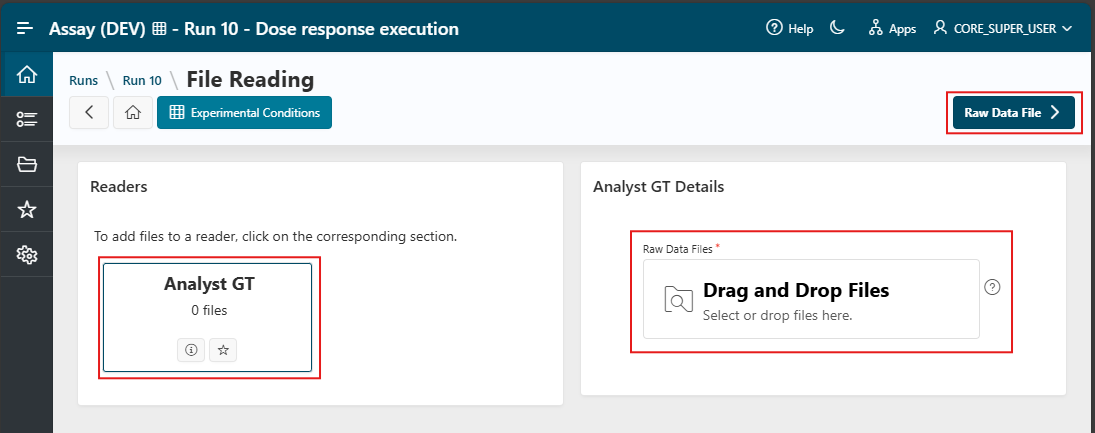
Once imported, the number of files is displayed below the reader names you selected.
Info
You can repeat this action for every file you want to import.
Click the Raw Data File button to have the application read your files.
Other Actions on the Page
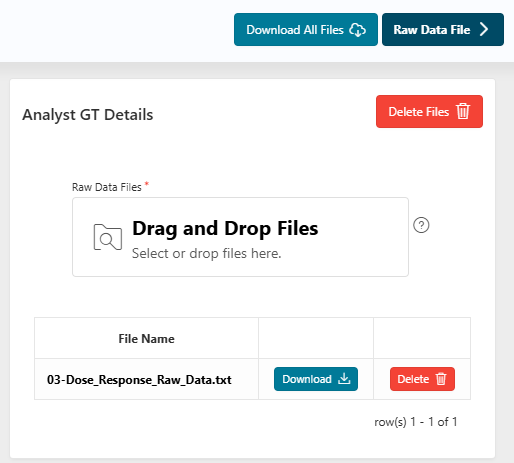
Before reading the files, you can:
- Delete one or multiple files linked to your readers.
- Download all files (using the top right
Downloadbutton). - Perform actions on the reader as explained above.
Interactive Readers
For some readers, extra pages may be required to read the files correctly. In that case, you will use what is called Interactive readers.
If so, the Raw Data File button is replaced by a button named Interactive reader.
Generic Reader
A common example of an interactive reader is the Generic Reader, which allows you to read any delimited text file (txt, csv, xlsx, etc.).
In Execution Mode, if the file format is the same as the one expected, the page will be automatically skipped, and all the information will be retrieved from the file.
Next Step
Next
 Continue the design of the run by going to the next step: Raw Data File step.