Primary Screening
Scientific Background
Compound cytotoxicity is an important parameter to measure when developing potential human therapeutics.
Jurkat clone E6.1 was screened against a diverse collection of 3,520 compounds. All compounds were tested once at a 1 μM final concentration.
A luciferase-based cell proliferation/viability assay endpoint kit was used as the readout. The kit measures the amount of ATP present in the microtiter plate well. If ATP is not present, the catalytic conversion of luciferin into oxyluciferin is not possible, and no luminescence results. Since metabolically active cells produce ATP, the absence of ATP correlates with the presence of non-viable cells.
This campaign used doxorubicin, an antibiotic used as an anti-cancer drug, as the positive control. The assay was conducted in 384-well format.
To select a practical number of compounds that exhibited high activity in the primary screen for follow-up assays, a cutoff value of the primary %Inhibition was applied. The cutoff value was calculated as the sum of the average percent inhibition of all compounds tested and three times their standard deviation (= HITS).
Prerequisites
- An existing run template, created using
Design Mode, following the tutorial in Primary Screening Tutorial.
Files to use:
Run Creation
- Click the
New Runbutton to create a new run. - Select
Execution Modeas the mode. - Select the appropriate
Run Template(the one saved in the Publisher Step ofDesign Mode). - Enter a
Run Name. - Go to the
File Readingstep.
File Reading
- The reader named
Analyst GT (TAB)is already fixed. - Upload the file
01-Primary_Screening_10p384raw_data. - Go to the
Raw Data Filestep.
Raw Data File
- Number of measurements per plate is already mapped:
1. - The
Readout Aliasis fixed toREADOUT1and cannot be modified. - Go to the
Plate Mappingstep.
Plate Mapping
The Control Layout named Primary_Screening is already applied to all plates.
- Go to the
Well Validationstep.
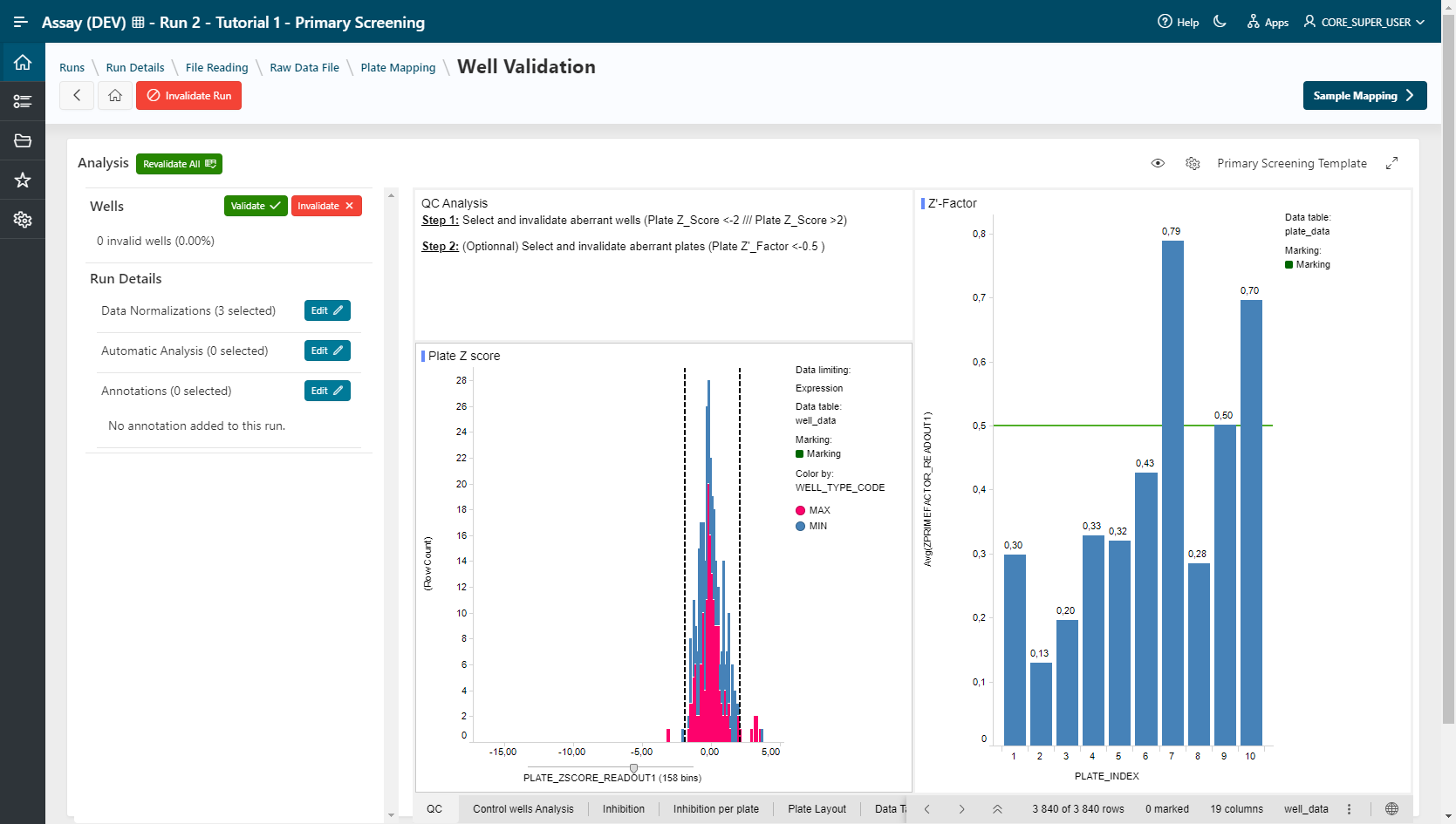
Well Validation
The visualization template selected in Design Mode is already applied. You can change this template.
For QC Validation, select aberrant wells in the visualization and click on the  button. Multiple selection is allowed by holding the Ctrl key.
Example
Plate_ZSCORE_READOUT1 < -2 or Plate_ZSCORE_READOUT1 > 2.
- Go to the
Sample Mappingstep.
Sample Mapping
- Click on the Edit Sample Information button.
- Select filling mode File and tick Sample and Dose for content.
- Choose file
01_Sample_Mapping_Primary_Screening. - Click on the Apply button.
Samples and doses are filled in.
- Click on the Continue button. Samples and doses are mapped for all plates.
- Click on the Sample Analysis Settings button.
Sample Analysis Settings
- Groups are automatically created (3,520 groups).
- Basic Statistics analysis is already applied.
- Go to
Sample Analysis.
Sample Analysis
The template specified in Design mode is applied.
- For Hits Selection, select points (“hits”) in visualization and add them to a list (click on the Add Hits button). This selection can be exported in CSV format (export button).
- Lock your Analysis (Lock Run button).
Publish Data
Depends on the Publisher defined in the run template.